Getting Started with Shell Scripting

Introduction
What is a Shell?
What is #!/bin/bash? Can we write #!/bin/sh as well?
Write a Shell Script that prints I will complete the #90DaysofDevOps challenge
Write a Shell Script to take user input, input from arguments and print the variables.
Write an Example of If else in Shell Scripting by comparing 2 numbers
Introduction:
Today we will be discussing shell scripting and with goes a little bit deeper with examples. first, let's discuss what is a shell in the next section.
What is Shell?
In easy words, it is the bridge between the Application and the Kernel. Shell provides users with an interface and accepts human-readable commands into the system and executes those commands which can run automatically and give the program’s output in a shell script.
Types: There are different types of Shell
The Bourne Shell (sh): Developed at AT&T Bell Labs by Steve Bourne, the Bourne shell is regarded as the first UNIX shell ever. It is denoted as sh. It gained popularity due to its compact nature and high speed of operation.
The GNU Bourne-Again Shell (bash): More popularly known as the Bash shell, the GNU Bourne-Again shell was designed to be compatible with the Bourne shell. It incorporates useful features from different types of shells in Linux such as Korn shell and C shell.
The C Shell (csh): The C shell was created at the University of California by Bill Joy. It is denoted as csh. It was developed to include useful programming features like in-built support for arithmetic operations and a syntax similar to the C programming language.
The Korn Shell (ksh): The Korn shell was developed at AT&T Bell Labs by David Korn, to improve the Bourne shell. It is denoted as ksh. The Korn shell is essentially a superset of the Bourne shell.
Besides supporting everything that would be supported by the Bourne shell, it provides users with new functionalities. It allows in-built support for arithmetic operations while offering interactive features which are similar to the C shell.
The Z Shell (ssh): The Z Shell or zsh is a sh shell extension with tons of improvements for customization. If you want a modern shell that has all the features a much more, the Zsh shell is what you’re looking for.
What is #!/bin/bash? Can we write #!/bin/sh as well?
First lets understand what #! stands for. It is an operator called shebang which directs the script to the interpreter's location. This is used by the shell to decide which interpreter to run the rest of the script, and is ignored by the shell that runs the script.
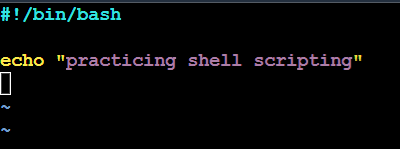
Yes, #!/bin/bash and #!/bin/sh both can be used in Linux. Although #!/bin/bash is the most popular and commonly used across the industries as it has more features and has a better syntax.
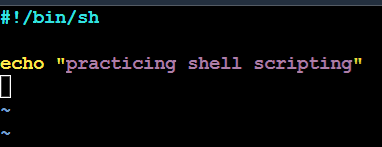
#!/bin/sh is used to execute the file using sh, which is a Bourne shell, or a compatible shell. Although it is recomended to use /bin/bash for its features rather than /bin/sh
Write a Shell Script that prints I will complete the #90DaysofDevOps challenge
In this section we will go through our first shell scpting example.

Here we have created a file with "touch myfirstshell.sh" command. ".sh" is the extension use to write the shell script. Next we have given the perssion with "chmod 700 myfirstshell.sh" and then with text editor vi we have written the context of our script.
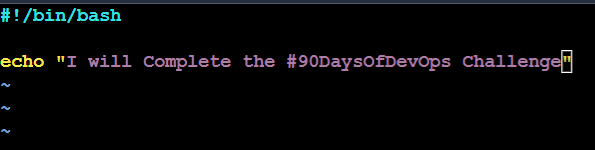
"echo" is the command to print the content. with this command, we will print the statement.

with the above command "./myfirst.sh" we can execute the shell command. Keep in mind that as we have given "700"(read, write, execute) permission to the user we can use "./" command.
Write a Shell Script to take user input, input from arguments and print the variables.
Let us use the file "myfirstshell.sh" and add the below script in vi editor
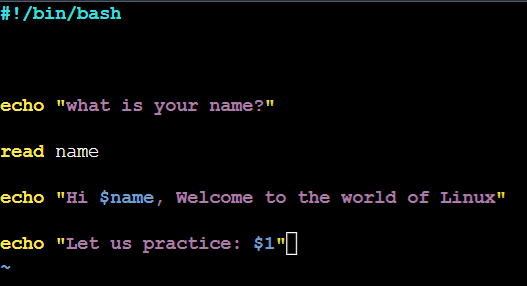
In this step we have ask for an input "what is your name?" and use "name" as a variable and read it. Then we print with the variable with "$name" here "$" has been used as a identified of the variable.
And next we have used an argument "$1" which we can use anything to pass with this argument. The below result is which we will see after executing the shell script "myfirstshell.sh"

Here we have passed the word "Shell" with a "(space)" with the executable command. We can use any parameter passed to the script.
Write an Example of If else in Shell Scripting by comparing 2 numbers
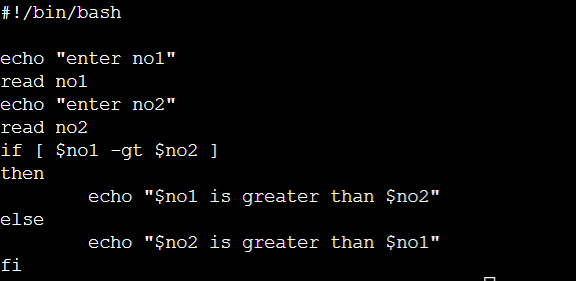
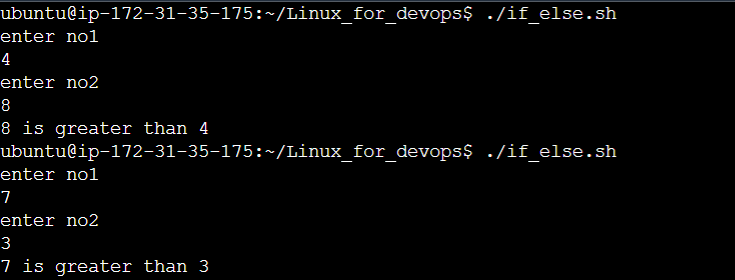
In this script we have use the operator "-gt" for greater than between two integers.The output looks like this