Advanced Linux Shell Scripting for DevOps Engineers with User management
📰👀 In this article, we will be witnessing 🤓🔝 more advanced level shell scripting with examples 📝💻🚀
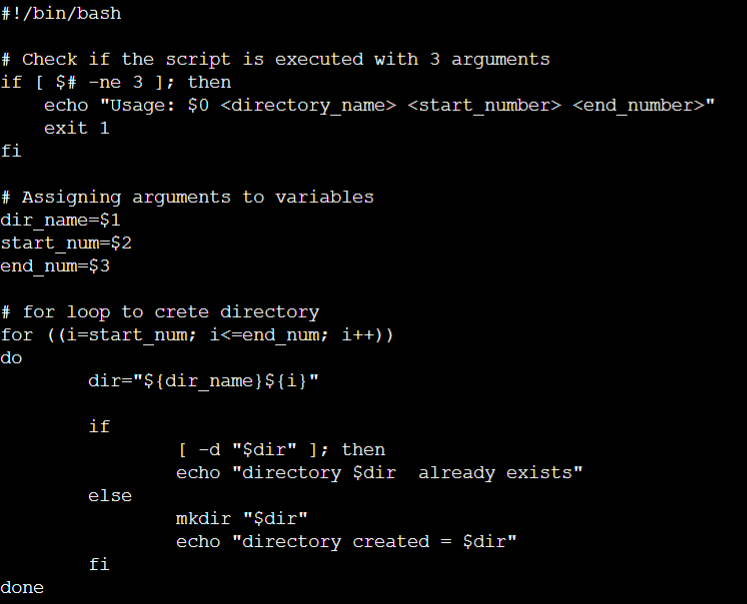
Example 1: a bash script creates directories.sh that when the script is executed with three given arguments (one is the directory name and second is the start number of directories and the third is the end number of directories ) it creates a specified number of directories with a dynamic directory name.
We can create and give execute permission to the create directories.sh.
Batch Script
Example 2:
Backups are an important part of DevOps Engineers' day to Day activities The video in References will help you to understand How a DevOps Engineer takes backups
Batch Script
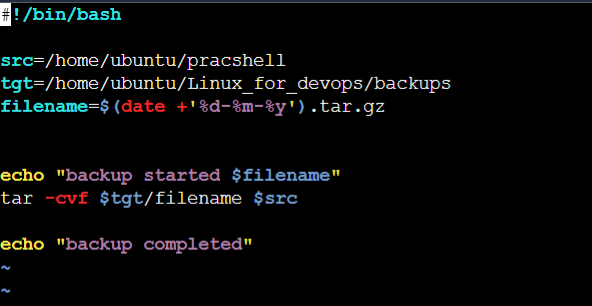
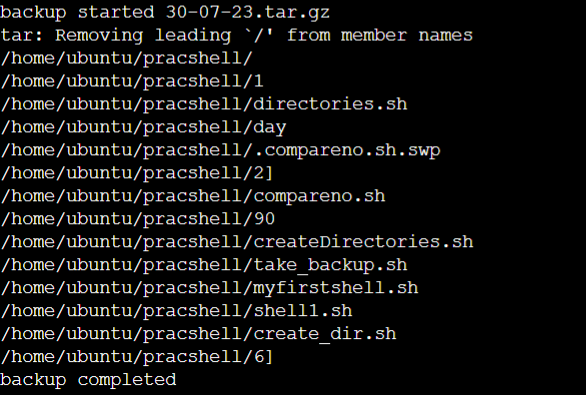
Here we have used a file from source "/home/ubuntu/pracshell" and kept a copy in the backup file in "/home/ubuntu/Linux_for_devops/backups" and also attached the date in ddmmyy format to keep track of the day of the backups. The output will look like this
We can use cron jobs to schedule the execution of a particular script, such as taking backups of the work we have done. By utilizing crontab, we can easily schedule the backups according to our specific requirements. with "crontab -e" we can schedule a task

Example 3: Create 2 users and just display their Usernames
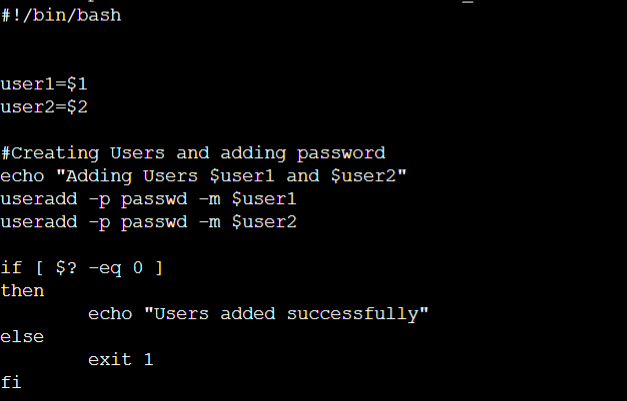
Here we have added user1 and user2 and passed two arguments and created two users using user1 and user2 as two variables.
if [ ${?} -eq 0 ]; then: This line checks if the exit status of the last command is 0, indicating success. If so, the code block following the if statement will be executed.


